Drive to resolve Error 421 Cleartext Sessions Are Not Accepted on This Server
Contents
FileZilla is a popular FTP client used for transferring files between computers. However, when attempting to connect to an FTP server, you may encounter the error message “421 Cleartext Sessions Are Not Accepted on This Server” This error indicates that the FTP server you’re trying to connect to does not allow unencrypted connections. Fortunately, there are steps you can take to resolve this issue and establish a secure connection. FileZilla is a user for file transfer on webserver
To Resolve Error 421 Cleartext Sessions Are Not Accepted on This Server
FileZilla Enable FTP over TLS/SSL
FTP over TLS/SSL adds an extra layer of encryption to your FTP connection, ensuring that data and authentication credentials are transmitted securely. It is possible To enable FTP over TLS/SSL in FileZilla that resolves The “421 cleartext sessions are not accepted on this server” issue, follow these steps:
- Open FileZilla and go to “Edit” -> “Settings.”
- In the settings dialog box, navigate to “FTP” -> “FTP over TLS settings.”
- Choose the appropriate option based on the server’s requirements. “Use explicit FTP over TLS if available” or “Require explicit FTP over TLS” are common choices.
- Click “OK” to save the changes.
FileZilla Use SFTP instead
SFTP (SSH File Transfer Protocol) is a secure alternative to FTP that uses the SSH protocol for encryption. If the server supports SFTP, you can connect to it using FileZilla by following these steps:
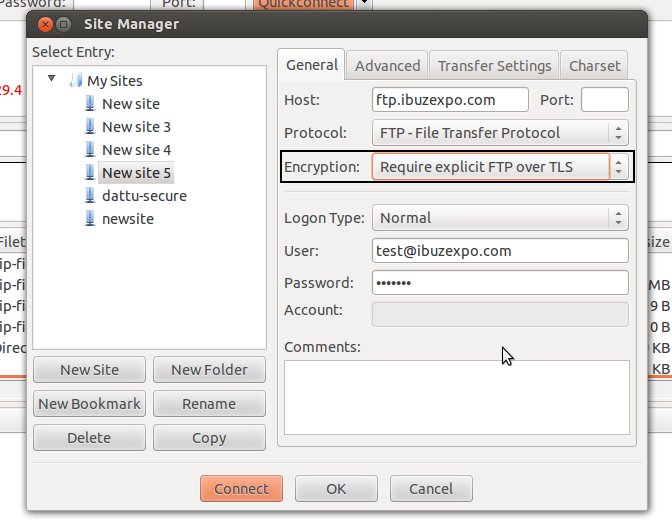
- Open FileZilla and click on “File” -> “Site Manager” to open the Site Manager dialog box.
- Click on “New Site” to create a new connection profile.
- In the “Protocol” dropdown, choose “SFTP – SSH File Transfer Protocol.”
- Enter the server details, such as hostname, port, username, and password.
- Click “Connect” to establish an SFTP connection.
Contact the server administrator
If the above solutions don’t work to resolve the error “421 cleartext sessions are not accepted on this server” or you don’t have control over the server settings, consider contacting the server administrator or hosting provider. They can provide information about the supported connection methods and any specific configurations required to establish a secure connection.
The “421 cleartext sessions are not accepted on this server” error in FileZilla indicates that the FTP server you’re connecting to does not allow unencrypted connections. By enabling FTP over TLS/SSL or using SFTP, you can establish secure connections and resolve this error. If you’re unable to configure the connection settings yourself, reaching out to the server administrator or hosting provider can provide further assistance. Remember, using encrypted connections is crucial for protecting your data during file transfers.
14 thoughts on “Drive to resolve Error 421 Cleartext Sessions Are Not Accepted on This Server”
Leave a Reply

Related Posts

Hey very nice website!! Man .. Beautiful .. Amazing .. I’ll bookmark your I’m happy to find a lot of useful info here in the post, we need work out more techniques in this regard, thanks for sharing. . . . . .
I feel this is among the so much important information for me. And i am happy studying your article. However want to remark on some normal issues, The site taste is great, the articles is actually nice : D. Excellent activity, cheers
Thanks a lot for sharing this with all of us you actually realize what you’re talking about! Bookmarked. Please additionally talk over with my site =). We can have a link alternate arrangement among us!
Heya i’m for the first time here. I came across this board and I find It really useful & it helped me out much. I hope to give something back and help others like you helped me.
Great work! This is the type of info that should be shared around the net. Shame on Google for not positioning this post higher! Come on over and visit my web site . Thanks =)
I do agree with all of the concepts you’ve introducedon your post. They’re really convincing and will definitely work.Nonetheless, the posts are very brief for newbies.May just you please extend them a bit from subsequent time?Thanks for the post.
Great blog you’ve got here.. It’s difficult to find excellent writing like yours these days. I seriously appreciate individuals like you! Take care!!
Hello there, You’ve done a great job. I will definitely digg it and personally recommend to my friends. I am confident they will be benefited from this website.
I think the admin of this website is in fact working hard in support of his website, as here every stuff is quality based stuff.
Hey there fantastic blog! Does running a blog similar
I am curious to find out what blog platform you happen to be utilizing? I’m experiencing some minor security issues with my latest blog and I would like to find something more safeguarded. Do you have any suggestions?
Thanks for reaching out!
If you’re experiencing security issues with your current blog setup, feel free to leave a comment below describing the specific problems you’re facing. The more details you share, the better I can help you figure out a safer and more reliable option.
Looking forward to hearing more about your issue!
I am sure this article has touched all the internet people, its really really nice post on building up new blog.
I’m not that much of a internet reader to be honest but your blogs really nice, keep it up! I’ll go ahead and bookmark your site to come back down the road. Many thanks