


Contents
- 1 How to Build and Deploy a Laravel CI/CD Using Jenkins
- 1.1 Why Use Jenkins for Laravel Deployment?
- 1.2 Understanding the Laravel CI/CD Using Jenkins Pipeline
- 1.3 Prerequisites for the Jenkins Setup
- 1.4 Prepare the Laravel Application
- 1.5 Create a Jenkinsfile
- 1.6 Connect Jenkins to Git
- 1.7 Configure Jenkins Credentials Securely
- 1.8 Deploy Laravel Through SSH
- 1.9 Run Tests Before Production Deployment
- 1.10 Production Optimization During Deployment
- 1.11 Zero-Downtime Deployment Strategy
- 1.12 Monitoring and Post-Deployment Verification
- 1.13 Common Jenkins and Laravel CI/CD Using Jenkins Problems
- 1.14 Best Practices for a Reliable Pipeline
- 1.15 Conclusion
How to Build and Deploy a Laravel CI/CD Using Jenkins
Laravel CI/CD Using Jenkins creates an automated path from a developer’s Git commit to a tested and deployable Laravel application. Instead of manually connecting to a server, pulling code, installing dependencies, running migrations, clearing caches, and restarting services, Jenkins can orchestrate these activities through a repeatable pipeline. This approach improves consistency, provides build history, and gives development and DevOps teams a controlled mechanism for delivering Laravel applications.
Jenkins is an automation server that can be used to implement continuous integration and continuous delivery pipelines. Its Pipeline functionality allows teams to define build, testing, deployment, and verification stages as code. By storing the pipeline definition in a Jenkinsfile, the deployment process can be version-controlled together with the Laravel application.
Why Use Jenkins for Laravel Deployment?
A Laravel application typically involves more than PHP source code. A production deployment may require Composer dependencies, environment configuration, database migrations, frontend assets, cache optimization, queue workers, scheduled tasks, and web-server or PHP-FPM changes.
Without automation, these steps can be performed differently by different administrators. A Jenkins pipeline provides a consistent sequence that can be executed after every approved change.
- Automated builds: Jenkins can start a build when source code changes.
- Automated testing: PHPUnit or Laravel test suites can run before deployment.
- Dependency management: Composer dependencies can be installed consistently.
- Controlled deployment: Only successful builds can proceed to production.
- Auditability: Jenkins records build results, logs, and deployment history.
- Repeatability: The same deployment process can be executed repeatedly.
Understanding the Laravel CI/CD Using Jenkins Pipeline
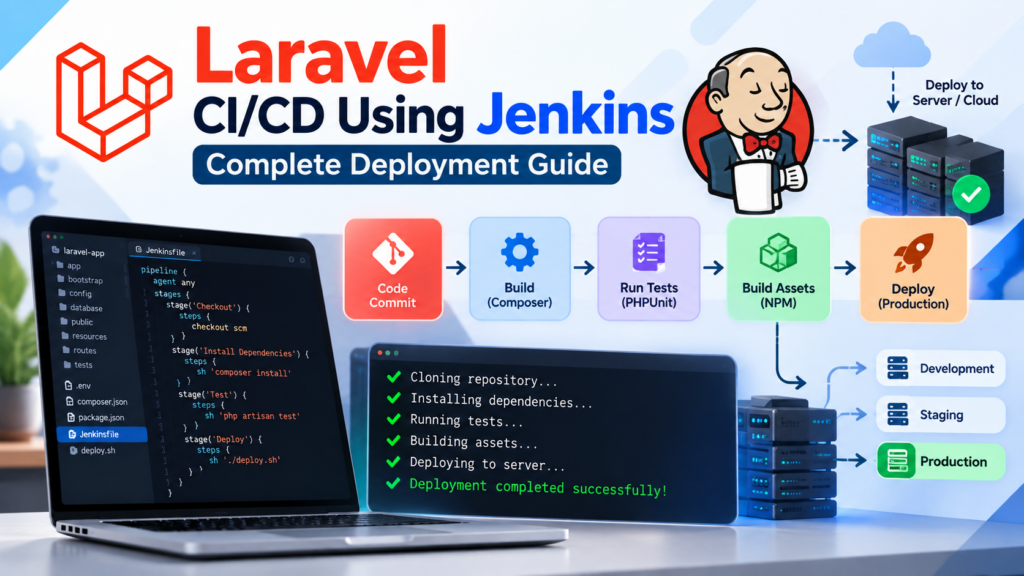
A practical pipeline separates application delivery into logical stages. Instead of treating deployment as one large script, each stage performs a specific responsibility. This makes failures easier to identify and allows teams to introduce quality gates before production deployment.
A Laravel workflow can therefore look like this:
- Source: Developer pushes code to Git.
- Build: Jenkins checks out the requested revision and installs dependencies.
- Quality: Static analysis, linting, or code-quality tools run.
- Test: Laravel automated tests execute against the configured test environment.
- Package: The application is prepared for deployment.
- Deploy: Jenkins transfers or releases the application to the target server.
- Verify: A health check confirms that the new release is responding correctly.
Prerequisites for the Jenkins Setup
Before implementing the pipeline, prepare both the Jenkins server and Laravel deployment server. The exact requirements depend on the deployment architecture, operating system, and Laravel version.
For a typical Linux-based Laravel deployment, you may need:
- Jenkins with Pipeline functionality enabled.
- Git installed on the Jenkins agent.
- PHP with the version required by the Laravel application.
- Composer.
- PHP extensions required by the project.
- Node.js and npm if frontend assets are compiled during CI.
- SSH access to the deployment server when using SSH-based deployment.
- A Git repository containing the Laravel application.
Prepare the Laravel Application
Before connecting Jenkins, make sure the application can be built and tested successfully from the command line. A typical Laravel project should have a valid composer.json and a committed composer.lock file.
composer install

php artisan optimize:clear

php artisan test
For production, Composer should normally install only production dependencies and use an optimized autoloader. Laravel’s configuration, routes, views, and other framework metadata can also be optimized as part of the deployment process.
Create a Jenkinsfile
The central component of the pipeline is the Jenkinsfile. Keeping this file inside the Git repository allows the CI/CD process to be version-controlled along with the Laravel application.
A basic Laravel pipeline might look like this:
pipeline {
    agent any

    stages {

        stage('Checkout') {
            steps {
                checkout scm
            }
        }

        stage('Install Dependencies') {
            steps {
                sh 'composer install --no-interaction --prefer-dist'
            }
        }

        stage('Test') {
            steps {
                sh 'php artisan test'
            }
        }

        stage('Build Assets') {
            steps {
                sh 'npm ci'
                sh 'npm run build'
            }
        }

        stage('Deploy') {
            steps {
                sh './deploy.sh'
            }
        }
    }

    post {
        always {
            echo 'Pipeline completed'
        }

        failure {
            echo 'Pipeline failed'
        }
    }
}
This example is intentionally simple. Production pipelines should add environment-specific configuration, credential management, deployment controls, health checks, backups, and rollback procedures according to the application’s requirements.
Connect Jenkins to Git
The next step is connecting Jenkins to the repository containing the Laravel application. Jenkins can monitor source-code changes and start pipelines when new commits are pushed. A multibranch pipeline can also be useful when the project uses multiple branches for development, testing, staging, and production.
A common repository structure could be:
laravel-project/
├── app/
├── bootstrap/
├── config/
├── database/
├── public/
├── resources/
├── routes/
├── tests/
├── composer.json
├── composer.lock
├── package.json
├── Jenkinsfile
└── deploy.sh
Keeping Jenkinsfile at the repository root makes the pipeline easy to discover and maintain.
Configure Jenkins Credentials Securely
Deployment credentials should never be hard-coded into the Jenkinsfile. Jenkins provides a credential-management mechanism that can securely store credentials and make them available to pipeline stages when required.
For an SSH-based deployment, a safer architecture is to store an SSH private key in Jenkins Credentials and allow the pipeline to use that credential when connecting to the deployment server.
- Do not commit private SSH keys to Git.
- Do not place production passwords directly in the Jenkinsfile.
- Restrict deployment credentials to the jobs that require them.
- Use separate credentials for development, staging, and production where practical.
- Rotate credentials according to your organization’s security policy.
Deploy Laravel Through SSH
One straightforward deployment strategy is to have Jenkins connect to a Linux server using SSH and execute a deployment script. The deployment script can install production dependencies, execute required Laravel commands, run migrations, and restart services when necessary.
For example, a deployment script could contain:
#!/bin/bash

set -e

cd /var/www/my-laravel-app

composer install --no-dev --optimize-autoloader

php artisan migrate --force

php artisan optimize

php artisan queue:restart
The --force option is important for non-interactive production migrations because the deployment process must explicitly permit migrations in a production environment.
Run Tests Before Production Deployment
A major benefit of automation is preventing an unsuccessful build from reaching production. Jenkins should normally stop the pipeline when a required test stage fails.
stage('Test') {
    steps {
        sh 'php artisan test'
    }
}
You can expand this stage with PHPUnit, static analysis, code style checks, dependency auditing, or other quality gates appropriate to the project.
For larger teams, automated testing can significantly reduce the risk of deploying changes that introduce regressions. The important principle is to measure the quality and reliability of the delivery process instead of assuming that automation alone guarantees better deployments.
Production Optimization During Deployment
After the application has passed testing, the deployment process should prepare Laravel for production. Typical commands include:
composer install --no-dev --optimize-autoloader

php artisan migrate --force

php artisan optimize
The Laravel optimization process can cache configuration, events, routes, and views. These optimizations help Laravel avoid repeatedly processing information that can be prepared ahead of time.
For example, production deployments commonly use the following command:
php artisan optimizeTeams should also make sure that environment-specific settings remain outside the application source code and that sensitive production values are managed securely.
Zero-Downtime Deployment Strategy
For applications where downtime is unacceptable, a simple approach that replaces the current application directory can be improved with a release-based architecture.
For example:
/var/www/myapp/
├── current -> releases/20260930-201500
├── releases/
│   ├── 20260930-201500/
│   ├── 20260929-184500/
│   └── 20260928-173000/
└── shared/
    ├── .env
    └── storage/
Jenkins can create a new release directory, install dependencies, build frontend assets, perform required database operations, execute health checks, and then update the current symbolic link.
If a deployment fails before activation, the existing release can remain active. If a problem is discovered after activation, the deployment system can switch the symbolic link back to the previous release, subject to database compatibility and other application constraints.
Monitoring and Post-Deployment Verification
A successful Jenkins build does not automatically mean that the production application is healthy. A robust pipeline should verify the deployed service after the deployment stage.
For example, a health endpoint can be checked after deployment:
curl --fail https://example.com/upLaravel applications can expose a health endpoint that can be incorporated into deployment verification. If the health check fails, Jenkins can mark the deployment as unsuccessful and trigger the appropriate rollback or notification procedure.
For production systems, monitoring should also cover PHP-FPM, Nginx, application logs, database connectivity, queue workers, scheduled tasks, CPU, memory, disk space, and external dependencies.
Common Jenkins and Laravel CI/CD Using Jenkins Problems
- Composer fails: Verify PHP extensions and the PHP version available on the Jenkins agent.
- Tests fail in Jenkins but work locally: Compare PHP, database, environment variables, extensions, and filesystem permissions.
- Database connection fails: Verify the CI test database configuration instead of using production credentials.
- Permission denied: Check ownership of Laravel’s writable directories and the user executing Jenkins commands.
- Frontend build fails: Confirm Node.js and npm versions are compatible with the project’s lockfile and build tooling.
- Deployment succeeds but queues stop: Ensure workers are restarted or gracefully reloaded after a release when required.
- Secrets appear in logs: Review Jenkins credential handling and avoid printing sensitive environment variables.
Best Practices for a Reliable Pipeline
A mature delivery process should treat the pipeline itself as production infrastructure. The pipeline should be version-controlled, reviewed, tested, and improved just like application code.
- Keep the
Jenkinsfilein source control. - Use separate staging and production environments.
- Run automated tests before deployment.
- Store secrets in Jenkins Credentials rather than Git.
- Pin important dependency and runtime versions.
- Use deployment approvals for sensitive production systems.
- Implement health checks after deployment.
- Maintain a documented rollback procedure.
- Monitor deployment frequency, lead time, failure rate, and recovery time.
- Keep production configuration separate from application source code.
Conclusion
Laravel CI/CD Using Jenkins transforms deployment from a collection of manual server commands into a repeatable software delivery process. Jenkins can connect Git, Composer, Laravel testing, frontend builds, deployment scripts, production optimization, and post-deployment verification into one controlled workflow.
The most important lesson is that successful CI/CD is not simply about adding Jenkins to a project. The pipeline should enforce quality before deployment, protect production credentials, produce repeatable releases, verify application health, and provide a practical recovery path when something goes wrong.
Laravel CI/CD using Jenkins deployment capabilities complement this approach through Composer optimization, framework caching, migrations, queue management, and application health checks. Jenkins provides the orchestration layer that connects these individual tasks into a consistent delivery workflow.
For Laravel developers and DevOps teams, learning to build a Jenkins pipeline is therefore a valuable step toward more predictable, secure, repeatable, and maintainable application delivery.