


Contents
- 1 Difference Between SCP and SFTP
Difference Between SCP and SFTP
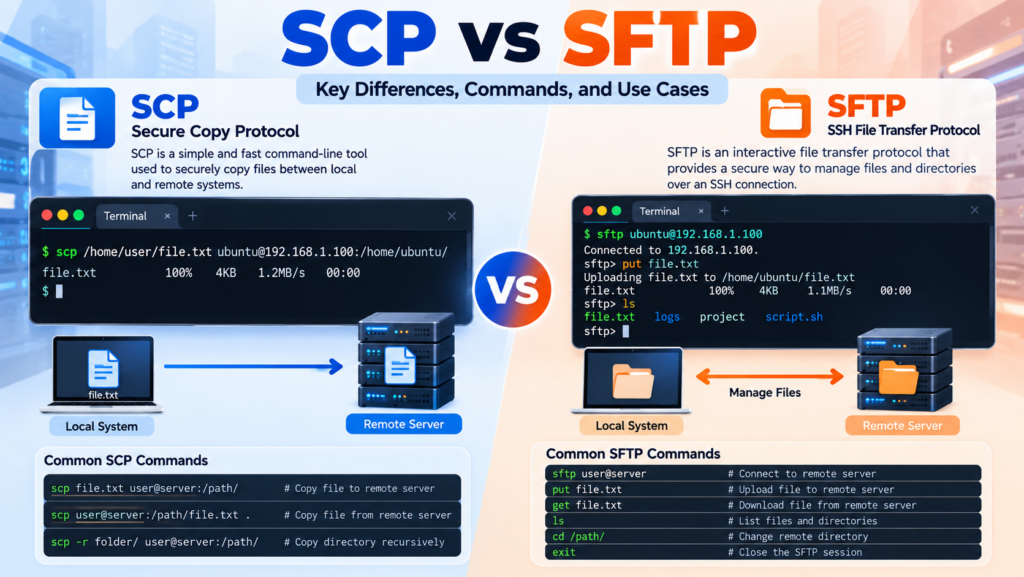
scp sftp difference is an important topic for Linux administrators, DevOps engineers, developers, and anyone who regularly transfers files between local computers and remote servers. Both SCP and SFTP use SSH-based security to protect data during transmission, but they are designed for different workflows. SCP focuses primarily on fast, straightforward file and directory copying, while SFTP provides an interactive environment for managing remote files and directories.
What Is SCP?
SCP stands for Secure Copy Protocol. It is commonly used from the command line to copy files and directories between a local system and a remote server over an SSH connection.
The biggest advantage of SCP is its simplicity. You specify the source, destination, username, and server, and the command performs the transfer.
scp file.txt user@192.168.1.100:/home/user/The command above transfers file.txt from the local computer to the remote server.
To download a file from the remote server:
scp user@192.168.1.100:/home/user/file.txt .SCP is particularly convenient when you already know the exact file path and simply need to move data from one system to another.
What Is SFTP?
SFTP stands for SSH File Transfer Protocol. It provides secure file transfer and remote file-management capabilities through an SSH connection. Unlike a basic SCP transfer, SFTP provides an interactive command-line session where you can navigate directories, upload files, download files, rename items, create directories, and perform other file-management operations.
Start an SFTP session with:
sftp user@192.168.1.100Once connected, commands such as the following can be used:
ls
pwd
cd /var/www
put file.txt
get backup.zip
mkdir uploads
rm old-file.txt
exit
This makes SFTP more suitable when you need to perform several file-management operations during the same connection.
Key SCP SFTP Difference
The most important scp sftp difference is their interaction model. SCP is primarily a copy command, while SFTP behaves more like a remote file-management client.
- SCP: Best for straightforward file and directory copying.
- SFTP: Best for interactive file transfers and remote file management.
- SCP: Usually works as a single command.
- SFTP: Can maintain an interactive session for multiple operations.
- SCP: Convenient for simple scripts and quick transfers.
- SFTP: Better suited to workflows requiring directory navigation and multiple file operations.
SCP vs SFTP Commands
Understanding the commands makes the scp sftp difference much easier to recognize.
SCP Examples
# Upload a file
scp application.zip user@server:/var/www/

# Download a file
scp user@server:/var/www/application.zip .

# Copy a directory
scp -r project/ user@server:/var/www/
SFTP Examples
# Connect
sftp user@server

# Upload
put application.zip

# Download
get backup.zip

# List remote files
ls

# Change remote directory
cd /var/www

# Exit
exit
For a single transfer, SCP often requires less interaction. For a sequence of operations, SFTP can be more convenient because the connection remains available while you work.
Security Comparison
Security is another important part of the scp sftp difference. Both tools commonly operate through SSH and can use SSH keys, passwords, host-key verification, and SSH configuration rules.
- Encryption protects data while it travels between systems.
- SSH authentication controls access to the remote account.
- SSH keys can eliminate the need for repeated password entry.
- Firewall rules can restrict access to the SSH service.
- File permissions determine what the authenticated user can access.
The security of either approach therefore depends not only on the transfer command but also on SSH server configuration, account permissions, key protection, network controls, and operating-system security.
Performance and Efficiency
Performance can vary depending on file size, network latency, CPU resources, encryption settings, server configuration, and the number of files being transferred. It is therefore misleading to claim that one protocol is always faster in every environment.
For example, if a DevOps engineer needs to copy one 500 MB deployment archive to a server, SCP provides a simple one-command workflow. If the engineer needs to upload 20 files, inspect directories, download logs, rename files, and remove obsolete artifacts, SFTP may provide a more efficient interactive workflow.
For automation, the number of operations and connection overhead can also matter. A team transferring 100 individual files should consider whether those files can be packaged into an archive before transfer rather than establishing unnecessary transfer operations.
SCP or SFTP for DevOps?
The appropriate choice depends on the task. The scp sftp difference becomes especially useful in DevOps environments where file transfers are part of deployment pipelines.
- Deployment package: SCP is convenient for transferring a single archive.
- Log retrieval: SFTP is useful when administrators need to browse directories and download selected logs.
- CI/CD automation: SCP can work well for simple scripted transfers.
- Remote file management: SFTP provides more interactive capabilities.
- Multiple manual operations: SFTP is generally more convenient.
Practical Deployment Example
Imagine a Laravel application where Jenkins creates a production archive named release.zip. A simple deployment process could use SCP to transfer the archive:
scp release.zip deploy@server:/var/releases/The server could then extract the release and activate it using a deployment script.
Alternatively, an administrator investigating a production issue might use SFTP:
sftp deploy@serverThey could navigate to the application’s log directory, list files, download a specific log, and exit the session without repeatedly establishing separate connections.
Important Limitations and Considerations
The scp sftp difference also involves how the tools fit into modern infrastructure. SCP is intentionally simple, but that simplicity means it is not designed to provide the rich interactive file-management features available through SFTP.
Before selecting either method, consider:
- Whether the transfer is automated or interactive.
- Whether you need remote directory management.
- The number and size of files being transferred.
- Whether your organization requires detailed access controls.
- Whether SSH access is already available on the target server.
Which One Should You Choose?
Choosing between SCP and SFTP becomes straightforward once the scp sftp difference is understood.
- Choose SCP when you need a quick, direct file or directory copy.
- Choose SFTP when you need an interactive remote file-management session.
- Choose SCP for simple deployment scripts where a known source and destination are sufficient.
- Choose SFTP when administrators need to browse, upload, download, rename, and delete remote files.
Conclusion
The scp sftp difference is primarily about workflow rather than basic security. SCP provides a simple command-oriented method for copying files and directories, making it useful for quick transfers and straightforward automation. SFTP provides a richer interactive environment for transferring and managing remote files through an SSH connection.
For DevOps engineers, both tools can be valuable. SCP is often the cleaner choice for a predictable deployment artifact, while SFTP is better when remote file inspection and management are required. Understanding the strengths and limitations of each tool allows you to select the right approach instead of treating them as interchangeable commands.
In short, use SCP when the job is “copy this file there”, and use SFTP when the requirement is “connect securely and manage files on that remote system.” That distinction is the key to choosing the right solution for Linux administration, development, and DevOps workflows.